SelectJet Imagesetter Positive Logo Positivity Tutorials
Separating from Illustrator
SelectJet Image Setter
 
Positivity home page
SelectJet & CopyJet imagesetter systems
Wasatch SoftRIP software
SelectJet & Copyjet Screen Films
xd imagesetting systems
Imagesetting resources
FAQs on imagesetting systems
Recommendations From Clients
Colour Management
Positivity Contact Details


Separating Artwork in Illustrator to PDF

Most established screen shops will generally have a RIP-based workflow for separating artwork and printing positives. A lot of newbies, without the software, have been struggling with the process.
This is a How-To for dummies.

You will need a copy of Adobe Illustrator (though the priciple is common to CorelDraw and Open-Source software) and a pdf printer. I've used Adobe Acrobat (not the reader) but you can use free utilities like CutePDF and PDFCreator, beware the browser toolbars that these freebies try to install, choose the Custom option and untick the 'please can we hijack your browser?' box.

Take my new logo idea (which might need some more work ) It's two spot colours which I need to separate. This will work with CMYK (no halftones - you need Ghostscript) or any number of spots.
Positivity Logo for separating

I've set the blue outline to overprint to make printing a bit easier. That means that there will be a slight overlap with the pink sitting under the outline of the text.

Let's try to print that:
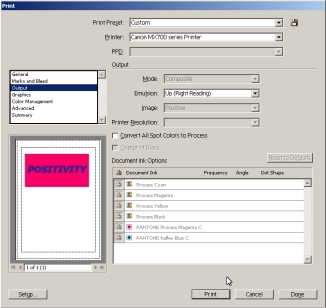
If I choose a non-postscript printer the Separations drop-down remains greyed-out.

Print Dialogue box greyed-out


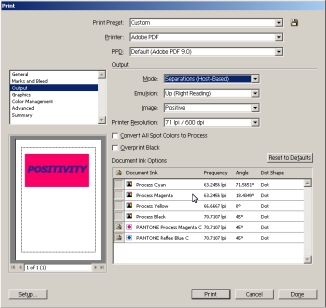
If I choose a Postscript printer then I have the option to use Separations (Host-based). The trick is that pdf = postscript.

PDF printer allows separation of design by Illustrator

I can then add registration marks.

Inset registration Marks

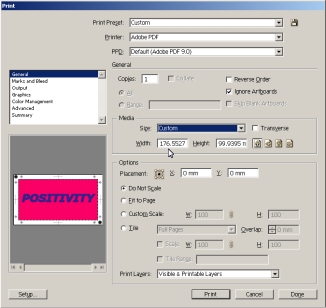
Choose a page size and press print.

Custom paper size in illustrator print dialogue box

This is a pdf which has been produced by this method, note the lettering will slightly overlap the pink.

Simple and elegant.

   
Screenprinting Tutorials
from Positivity

Separating Artwork to PDF - Illustrator

Printing from Ghostscript

Convert a Logo for Screenprinting Corel X4

Simple Exposure Calculation

What is an ICC Profile?

Corel PowerClip

Exposure Problems - details


Wasatch Tutorials
and Videos

Spot Colour Replacement

Colour Atlas Generation

Dynamic Layout

Variable Data

RIP Queues

Wasatch ImageNet

Cost Estimation

'Popping' Colour 1

'Popping' Colour 2

Wasatch Port Redirector

Print From a Mac

Hot Folders

Templates


Positivity Contact Details 01793 686 380
Home | Imagesetters | Films | RIP | Clearance | Resources | Feedback | FAQs | Colour | Contact